# 3 Huge Mistakes Django Developers Make

Django is a very interesting framework as it allows you to create web applications with python as a backend. Not only that, but it can also handle most of the database stuff so we don’t have to worry about tables, for small applications at least, and can focus on the dinner.

Despite being a very helpful framework, Django has a steep learning curve that can startle beginners and leave them unchained — I hope you are getting my jokes.

In this post, I will try to make your life much easier by introducing you to some of the best Django features and practices.

## 1. Repeating The Template Code

Django provides you with a lot of different ways to reuse your code and make your code more efficient and readable. One such feature is Django's **template tags and filters.**

It allows you to write logic inside of an HTML file and display relevant data. There are many [built-in tags and filters](https://docs.djangoproject.com/en/3.2/ref/templates/builtins/) but you can also create your own.

One such tag is `include` and it allows us to reuse our HTML. Here’s how I used it on my website:

![](https://cdn.hashnode.com/res/hashnode/image/upload/v1629189132496/PBrjGoT2B.png)

![Left: latest articles on my Home page. Right: all articles on my Articles page](https://cdn.hashnode.com/res/hashnode/image/upload/v1629189134643/I1D45wvtA.png)*Left: latest articles on my Home page. Right: all articles on my Articles page*

I wanted to display my latest articles on the ‘Home’ page and also on the ‘Articles’ page.

As the design of the article card remains the same, the best way to tackle this would be to create a common HTML and reuse it on both the pages using include. Here’s what it looks like in code:

```html
<div class="articles-div container">
    <div class="left-col">
        {% for article in left %}
        {% include "main/includes/article.html" with link=article.medium_link image=article.image.url title=article.title tags=article.tags date=article.date_created %}
        {% endfor %}
    </div>

    <div class="right-col">
        {% for article in right %}
        {% include "main/includes/article.html" with link=article.medium_link image=article.image.url title=article.title tags=article.tags date=article.date_created %}
        {% endfor %}
    </div>
</div>
```

As you can see in the above code, I am looping through all the articles passed by `views.py` file, and for each article, it is creating `{% include %}` to add the desired HTML. (In the next example we will see how the views.py file passes this data) The syntax to use include looks like this:

```
{% include “file_name” with argument_name=”some_argument” second_argument_name=”another_argument” %} 
```


The `with` keyword is optional, use it when you need to pass arguments to your HTML. To pass string arguments, put it inside `“”` or you can also pass variables.

```html
{% load static %}
<link rel="stylesheet" href="{% static 'css/include/articles.css' %}">

<a href="{{ link }}" target="blank">
  <div class="article">
      <img class = "article-img" src="{{ image }}" alt="">
      <h4 class="article-title">{{ title }}</h4>
      <ul class="tags">
          <li class="{{ tags }}">{{ tags }}</li>
          <p class="date">{{ date }}</p>
      </ul>

  </div>
</a>
```

The above code is for my article card. In the first line, I am using `{% load static %}` to access static files i.e any CSS, JS, or image file. To use the arguments passed from `include` tag, you must put the argument name inside `{{}}` like — `{{ argument_name }}`

So that was how to reuse your HTML. Now let’s look at class-based views which are often neglected or not known to new Django developers.

## 2. Using Function Based Views

Firstly, I would like to clear the misconception that class-based views (CBV) are better than function-based views (FBV): they are not.

It depends on the use case and both have their own advantages. I added CBV in this article because they allow you to remove redundancy from your code which is often present with FBV. So, it's good to know about CBVs.

If you have ever created any Django project, you must be aware of FBV. They are easy to create and read but not so good when it comes to reusability.

Django provides you with generic views which you can inherit into your own view class and override its contents. So most of the things are already created for you, you just need to customize them to fit your needs. Here’s how I used it in my blog.

```python
from django.views.generic import ListView
class ArticlePage(ListView):
    model = Articles
    template_name = "main/articles.html"

    def get_context_data(self, **kwargs):
        article_data = super(ArticlePage, self).get_context_data(**kwargs)

        tag = self.kwargs.get('tag', None)
        if tag != None:
            if tag in "Tech Programming Productivity Crypto":
                articles = Articles.objects.filter(
                    tags=tag).order_by('-date_created')
        else:
            articles = Articles.objects.order_by('-date_created')

        left, middle, right = left_middle_right(articles)
        article_data['left'] = left
        article_data['middle'] = middle
        article_data['right'] = right
        return article_data
```

`ListView` is one of the most common generic classes which is used to list all the items in a database. To use it, just create a class in your `views.py` file and inherit the class from` django.views.generic import ListView` .

In the simplest case, you just need to create a `model` variable and everything else is taken care of. The default template name is `“model_name”_list.html` but of course you can change it as I have done above.

To further customize it, you can override the functions. In my case, I wanted to sort the articles by date or tags and then separate them into three chunks for my three columns in the template file. Below is how you can use `article_data` in your template file.

```html
<div class="articles-div container">
    <div class="left-col">
        {% for article in left %}
        {% include "main/includes/article.html" with link=article.medium_link image=article.image.url title=article.title tags=article.tags date=article.date_created %}
        {% endfor %}
    </div>
    <div class="mid-col">
        {% for article in middle %}
        {% include "main/includes/article.html" with link=article.medium_link image=article.image.url title=article.title tags=article.tags date=article.date_created %}
        {% endfor %}
    </div>

    <div class="right-col">
        {% for article in right %}
        {% include "main/includes/article.html" with link=article.medium_link image=article.image.url title=article.title tags=article.tags date=article.date_created %}
        {% endfor %}
    </div>

</div>
```

In the previous example, we saw how to reuse templates using include. That template gets the data from `left` `right` and `middle` of out `article_data` variable. But, that’s not it. There is one thing we need to do in our `urls.py` file to use CBV.

```python
from .views import ArticlePage

app_name = "main"

urlpatterns = [
    path('articles', ArticlePage.as_view(), name="articles"),
]
```

We first need to import our class and then use it in the `urlpatterns` with `.as_view()` function. This is because Django’s URL resolver expects to send the request and arguments to a function and not a class. You just need to use `.as_view()` function and Django takes care of the rest.

## 3. Large views.py File

The `views.py` file contains most of our logic and therefore it can grow to hundreds of lines of code. This makes debugging tougher and makes the code harder to read. Here’s how to break the file without breaking your code.
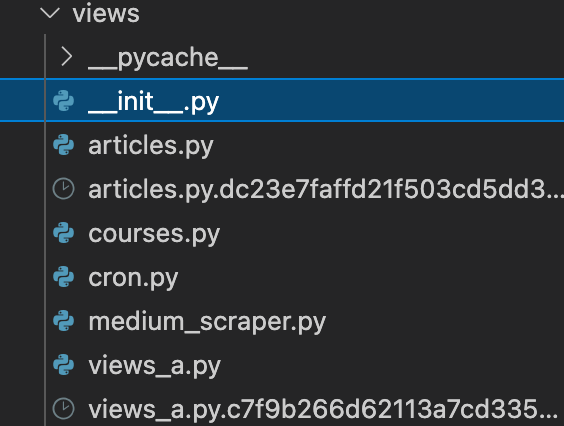
![Screenshot of views folder](https://cdn.hashnode.com/res/hashnode/image/upload/v1629189136607/XlhUqizES.png)*Screenshot of views folder*

Create a folder named views and create a file inside it called `__init__.py` . Now you can break your views.py file and put each of its classes or functions into different files.

In my case, I am using `views_a.py` file for all CBVs and have created more files for each operation.

If you have split functions and classes from the original views.py file into multiple files, import all the things from those files inside your `__init__.py` file as shown below:

```python
from .medium_scraper import *
from .views_a import *
from .articles import *
```

In the above case, I actually don’t need to import anything other than `views_a` . This is because all of my view objects, which will be used in `urls.py` file, are inside `views_a`.

But if you have them separated into multiple files you would need to import each one of them like shown above:

```python
from django.contrib import admin
from django.urls import path
from .views import *

app_name = "main"

urlpatterns = [
    path('home', Homepage.as_view(), name="home"),
    path('articles', ArticlePage.as_view(), name="articles"),
    path('articles/<str:tag>/', ArticlePage.as_view(), name="articles"),
    path('about', AboutPage.as_view(), name="about"),
    path('courses', CoursePage.as_view(), name="courses"),
    path('resources', ResourcesPage.as_view(), name="resources"),
    path('projects', views.projects, name="projects"),

]
```

Finally, type `from .views import *` to import all your view objects.

## Conclusion

That’s it for this one! I hope it improves your Django code by at least 2x.

*If you have doubts or suggestions, you can reach me out on my [socials](https://y.at/%F0%9F%92%BB%F0%9F%8E%A5%E2%9C%8D%E2%98%95).*
